
Have you faced the situation when handling million queues and your system still acting on high performance and low latency? One of the solution approached is using distributed messaging and streaming platform by RocketMQ.
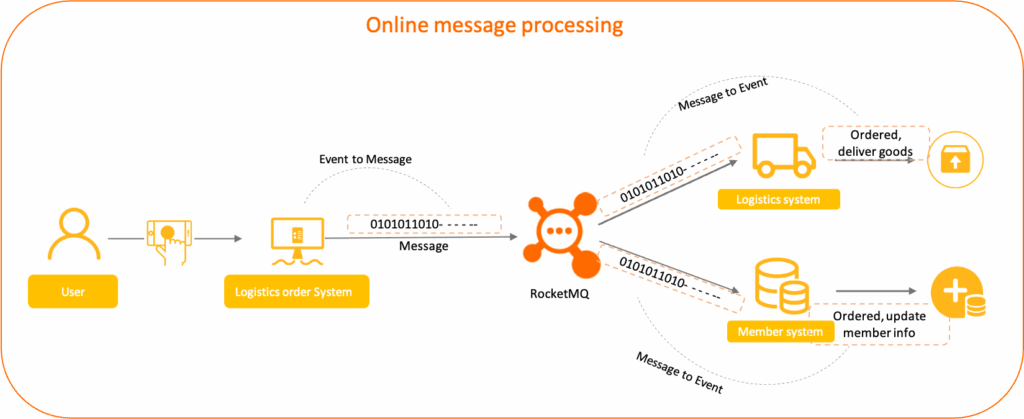
Story Behind RocketMQ
RocketMQ is module developed by Alibaba and then donated to Apache for the biggest community and become the top level project. RocketMQ is designed for large scale, high performance application that require reliable message ordering, concurrency, scalability and fault tolerant.
RocketMQ Roles
Decoupling Service
RocketMQ enables loose coupling between producer and consumer which benefit is become easier for maintenance and better system modularity
Asynchronous Communication
RocketMQ queues these messages and ensures they are delivered to consumer which benefit to improve responsiveness and throuhput.
Reliable Message Delivery
Guarantee delivery by persistence, message retry and acknowledgement which benefit for high reliability and data integrity in distributed operation.
Scalability
RocketMQ is horizontal scalable which can handle millions message per second which benefit easy to scale up both producer and consumer without bottleneck.
Message Ordering
Supports strict and partial message ordering which is critical on transaction handling and state update.
Distributed Transaction
RocketMQ support for transactional message that ensure data consistency on complex transaction such as order processing and payment.
One of the RocketMQ feature is very scalable with less config complexity.
Sample Producer and Consumer RocketMQ
Now, let try create sample application how RocketMq implemented on Java Spring Boot. By the way, RocketMQ client SDK only for Java,Go and C++.
You can refer to this Github repository for Producer App here and for consumer on this repository. What we are going to write is explained from diagram below. Let’s assume an e-commerce app that when order is created there will be monitoring is notified and inform operation to handle and when order is purchased the system will update stock from inventory and notify the order receipt to customer. Image that million order is created on your e-commerce app on Flash Sale, what you want is your app run in good performance and keep user experience on your app is good, so let’s we handled by utilized RocketMQ on this situation.
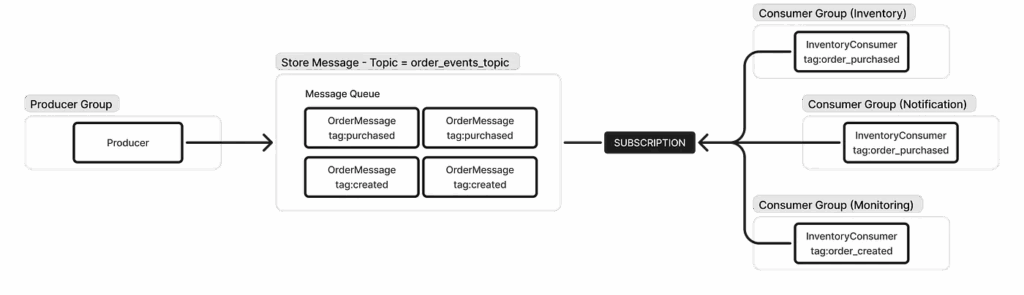
Make sure you have installed RocketMQ on your working env (local or VPS), take look this guideline.
Let start from Producer, make sure your rocketmq.name-server is correct to where IP RocketMQ is installed. Let say there will be two controllers for purchaseOrder and createOrder.
@PostMapping("/purchase")
    public ResponseEntity<String> purchaseOrder(@RequestBody OrderMessage request) {
        // Generate random UUID
        String orderId = UUID.randomUUID().toString();
        request.setOrderId(orderId);
        request.setStatus("PURCHASED");
        request.setTimestamp(LocalDateTime.now());

        log.info("Simulating order purchase for orderId: {}", orderId);
        orderProducerService.sendOrderPurchasedMessage(request,"order_purchased");

        return ResponseEntity.ok("Order " + orderId + " processed and message sent.");
    }
    @PostMapping("/initialize")
    public ResponseEntity<String> createdOrder(@RequestBody OrderMessage request) {
        // Generate random UUID
        String orderId = UUID.randomUUID().toString();
        request.setOrderId(orderId);
        request.setStatus("CREATED");
        request.setTimestamp(LocalDateTime.now());

        log.info("Simulating order created for orderId: {}", orderId);
        orderProducerService.sendOrderPurchasedMessage(request,"order_created");

        return ResponseEntity.ok("Order " + orderId + " processed and message sent.");
    }
and OrderProducerService that produce messege to RocketMQ.
public void sendOrderPurchasedMessage(OrderMessage orderMessage,String tag) {
        String destination = defaultTopic + ":" + tag;
        rocketMQTemplate.asyncSend(destination, orderMessage, new SendCallback() {
            @Override
            public void onSuccess(SendResult sendResult) {
                System.out.println("Message sent successfully: " + sendResult);
                log.info("Message sent successfully. OrderId: {}, Topic: {}, Tag: {}",
                        orderMessage.getOrderId(), defaultTopic, tag);
            }
            @Override
            public void onException(Throwable e) {
                e.printStackTrace();
                System.err.println("Failed to send message: " + e.getMessage());
            }
        });

    }
Let’s continue create ConsumerService, for this sample we just create one spring boot project and there will be 3 consumers for each Inventory, Notification and Monitoring you can add more consumers based on your needs then such as Payment, Report Big Data etc.
Create spring boot project with gradle dependencies like below
dependencies {
 implementation 'org.springframework.boot:spring-boot-starter-web'
 compileOnly 'org.projectlombok:lombok'
 annotationProcessor 'org.projectlombok:lombok'
 testImplementation 'org.springframework.boot:spring-boot-starter-test'
 testRuntimeOnly 'org.junit.platform:junit-platform-launcher'
 implementation 'org.apache.rocketmq:rocketmq-spring-boot-starter:2.3.3'
}
Let take example for Inventory Consumer
@Component
@Slf4j
@RocketMQMessageListener(
        topic = "order_events_topic",
        consumerGroup = "inventory_consumer_group",
        selectorExpression = "order_purchased" // Subscribe to messages with this tag
)
public class InventoryConsumer implements RocketMQListener<OrderMessage> {

    @Override
    public void onMessage(OrderMessage orderMessage) {
        log.info("Inventory System: Received Order Message: {}", orderMessage);
        // Simulate inventory update logic
        try {
            // Deduct items from stock, update database, etc.
            log.info("Inventory System: Successfully updated inventory for Order ID: {} with amount: {}",
                    orderMessage.getOrderId(), orderMessage.getAmount());
            // If any error occurs, you can throw an exception to trigger a re-delivery attempt
            // throw new RuntimeException("Simulated inventory update failure");
        } catch (Exception e) {
            log.error("Inventory System: Failed to process order message for Order ID: {}", orderMessage.getOrderId(), e);
            // RocketMQ will handle retries if an exception is thrown
            throw e;
        }
    }
}
You can process the OrderMessage for Inventory management here, for another consumer like Notification or Monitoring you can see detail on github repository.
Let’s run and simulate how it works.
- Make sure RocketMQ is running namesrv and broker.
- Run the producer project
- Run the consumer project
- Hit order purchased and order created.
curl --location 'localhost:8080/orders/initialize' \
--header 'Content-Type: application/json' \
--header 'Cookie: JSESSIONID=492E4DF79B306E5FCE53BBC9F679FA6F' \
--data '{
    "userId": 902934,
    "amount": 6500000,
    "productDetails": "Laptop Macbook Pro 2025"
}'
curl --location 'localhost:8080/orders/purchase' \
--header 'Content-Type: application/json' \
--header 'Cookie: JSESSIONID=492E4DF79B306E5FCE53BBC9F679FA6F' \
--data '{
"userId": 902934,
"amount": 6500000,
"productDetails": "Laptop Lenovo Thinkpad"
}'See log on your consumer project for Inventory like below:
Inventory System: Successfully updated inventory for Order ID: fccfb655-9680-48e6-8844-ecb599cbf2f7 with amount=6500000.0Think about million queues are waiting to process, it can be handled by RocketMQ. This tools is suitable for micro-services architecture and event-driven architecture. It promise the low latency and high throughput.
One response
[…] Read : Message Broker using Rocket MQ in Java Spring Boot […]